Automatic chat translation for Rust servers.
Running an international Rust server should not mean players have to copy messages into external translators just to understand each other.
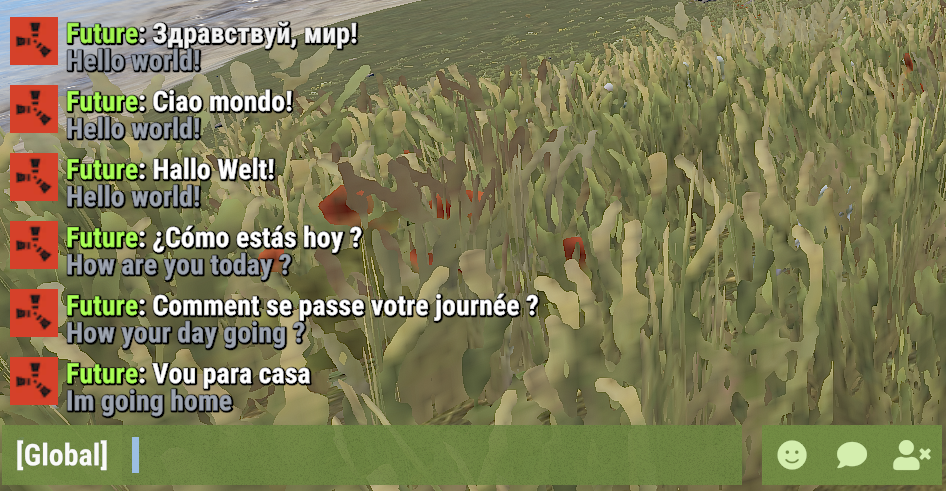
TranslateSystem automatically translates chat messages into each player's selected language while keeping the normal Rust chat experience. Players can use their Rust client language automatically or choose their own language, while server owners can control chat channels, translation services, preserved Rust terms, caching, message filters, permissions, and request limits.
Perfect for PvE, PvP, Vanilla+, modded, RPG/RP, international servers, or any server with players speaking different languages.
 Features
 Supported Languages
TranslateSystem supports all 25 Rust client languages, allowing players to communicate across different languages without manually translating chat messages.
Players can automatically use their Rust client language or manually select their preferred translation language.
 Commands
Command aliases are fully configurable.
Command Examples
 Admin Command
 Permissions
 Translation Services
TranslateSystem supports multiple translation providers, allowing server owners to select the service that best fits their server.
MyMemory
Google
Microsoft
Yandex
LibreTranslate
OpenAI
 Chat Channels
TranslateSystem supports multiple Rust chat channels, with separate configuration options for each channel.
Each supported chat channel can be enabled or disabled separately.
Preserved Rust Terms
TranslateSystem allows server owners to configure words and phrases that should remain unchanged during translation.
This is useful for preserving commonly used Rust terminology, weapon names, monument names, and abbreviations.
Examples of preserved terms:
 Translation Cache & Request Controls
TranslateSystem includes configurable caching and request controls to help manage translation API usage.
 Message Filters
TranslateSystem includes optional message filters to reduce unnecessary translation requests.
 Example Configuration
 Why Choose TranslateSystem?
Language differences can make communication difficult on Rust servers with players from different countries. TranslateSystem handles translation automatically for each player while still giving them control over whether translations are enabled and which language they want to use.
With support for all 25 Rust client languages, multiple translation services, BetterChat and IQChat compatibility, configurable chat channels, preserved Rust terms, caching, message filters, and request controls, TranslateSystem makes it easier for players speaking different languages to communicate naturally in the same chat.
Whether you run a small international server or a large multilingual community, TranslateSystem helps remove language barriers without requiring players to leave the game or use external translation tools
Running an international Rust server should not mean players have to copy messages into external translators just to understand each other.
TranslateSystem automatically translates chat messages into each player's selected language while keeping the normal Rust chat experience. Players can use their Rust client language automatically or choose their own language, while server owners can control chat channels, translation services, preserved Rust terms, caching, message filters, permissions, and request limits.
Perfect for PvE, PvP, Vanilla+, modded, RPG/RP, international servers, or any server with players speaking different languages.
Features- Automatically translates chat messages separately for each player's language.
- Uses the player's Rust client language automatically or allows players to select their own language.
- Supports Global, Team, Local, Clan, and Card Game chat channels.
- Enable or disable translation separately for each supported chat channel.
- Supports MyMemory, Google Cloud Translation, Microsoft Translator, Yandex Cloud, LibreTranslate, and OpenAI.
- MyMemory is available as the default translation service and fallback if another configured provider fails.
- BetterChat and IQChat support while keeping their chat formatting.
- Players can enable or disable translations for themselves at any time.
- Optional permission requirement for receiving translations.
- Option to translate the sender's own messages.
- Option to show the original message underneath the translated message.
- Automatic source-language detection.
- Custom language selection for individual players.
- Preserved Rust terms prevent configured words such as TC, Oil Rig, Cargo, Bradley, AK, sulfur, HQM, Workbench, monument names, and other terms from being translated.
- Built-in translation cache reuses recent translations and reduces unnecessary API requests.
- Configurable cache lifetime and maximum stored translations.
- Message filters can ignore messages without letters, very short messages, and colon emoji codes such as
:heartrock:. - Optional per-player rate limiting.
- Configurable maximum simultaneous translation requests.
- Configurable API timeout, failed-request cooldown, and rate-limit cooldown.
- Optional server console chat logging.
- Configurable command aliases.
- Player translation settings and selected languages are saved automatically.
- English and Russian plugin messages included.
Supported LanguagesTranslateSystem supports all 25 Rust client languages, allowing players to communicate across different languages without manually translating chat messages.
Players can automatically use their Rust client language or manually select their preferred translation language.
| Language | Language Code |
|---|---|
| English | en |
| Russian | ru |
| German | de |
| French | fr |
| Spanish (Spain) | es |
| Spanish (Latin America) | es-419 |
| Italian | it |
| Turkish | tr |
| Arabic | ar |
| Czech | cs |
| Danish | da |
| Greek | el |
| Polish | pl |
| Ukrainian | uk |
| Japanese | ja |
| Korean | ko |
| Chinese (Simplified) | zh-cn |
| Chinese (Traditional) | zh-tw |
| Dutch | nl |
| Norwegian | no |
| Swedish | sv |
| Finnish | fi |
| Portuguese (Portugal) | pt-pt |
| Portuguese (Brazil) | pt-br |
| Vietnamese | vi |
Commands/translate - Shows your current translation status and available commands./translate on - Enables automatic chat translations for yourself./translate off - Disables automatic chat translations for yourself./translate auto - Uses your Rust client language for translations./translate lang <code> - Sets your translation language manually./translate status - Shows whether translation is enabled and which language is currently being used.Command aliases are fully configurable.
Command Examples
Код:
/translate
/translate on
/translate off
/translate auto
/translate lang en
/translate lang de
/translate lang ru
/translate lang fr
/translate lang es-419
/translate lang zh-cn
/translate status/translate stats - Shows the current translation cache size and active translation requests. Permissionstranslatesystem.use - Required to use TranslateSystem commands and receive translations when the permission requirement is enabled in the configuration.translatesystem.admin - Allows access to /translate stats. Translation ServicesTranslateSystem supports multiple translation providers, allowing server owners to select the service that best fits their server.
| Service | Description |
|---|---|
| MyMemory | Default translation service without requiring your own API key. |
| Google Cloud Translation using your API key. | |
| Microsoft | Microsoft Translator using a subscription key and optional resource region. |
| Yandex | Yandex Cloud Translation using your API key. |
| LibreTranslate | Connect to a LibreTranslate server with optional API-key support. |
| OpenAI | OpenAI API translation with configurable API key, model, and token limit. |
MyMemory
- Available as the default translation service.
- Does not require server owners to configure their own translation API key.
- Can serve as a fallback when another configured translation provider fails.
- Supports Google Cloud Translation.
- Requires a Google Cloud Translation API key.
- Can be selected as the main translation provider.
Microsoft
- Supports Microsoft Translator.
- Requires a Microsoft Translator subscription key.
- Supports an optional resource region.
Yandex
- Supports Yandex Cloud Translation.
- Requires a Yandex Cloud service account API key.
LibreTranslate
- Supports LibreTranslate servers.
- Configurable server address.
- Optional API key for servers requiring authentication.
OpenAI
- Supports translation using the OpenAI API.
- Configurable API key.
- Configurable model.
- Configurable maximum completion token limit.
Chat ChannelsTranslateSystem supports multiple Rust chat channels, with separate configuration options for each channel.
| Chat Channel | Description |
|---|---|
| Global | Translates messages sent in global chat. |
| Team | Translates messages between team members. |
| Local | Translates messages in nearby-player chat. |
| Clan | Translates supported clan chat messages. |
| Card Games | Translates messages in supported card game chat. |
Each supported chat channel can be enabled or disabled separately.
Preserved Rust TermsTranslateSystem allows server owners to configure words and phrases that should remain unchanged during translation.
This is useful for preserving commonly used Rust terminology, weapon names, monument names, and abbreviations.
Examples of preserved terms:
- Building and resources: TC, HQM, Workbench, scrap, sulfur.
- Weapons: AK, AK-47, LR, L96, M2, M249, MP5, SAR, DB, Tommy, Thompson.
- Monuments and events: Oil Rig, Large Oil, Small Oil, Cargo, Cargo Ship, Bradley, Outpost, Bandit Camp, Launch Site, Airfield, Dome, Train Yard, Power Plant, Military Tunnels.
Translation Cache & Request ControlsTranslateSystem includes configurable caching and request controls to help manage translation API usage.
| Setting | Description |
|---|---|
| Translation Cache | Reuses recently translated messages to avoid unnecessary translation requests. |
| Cache Lifetime | Controls how long cached translations are kept. |
| Maximum Cached Translations | Limits the number of translations stored in the cache. |
| Maximum Simultaneous Requests | Controls how many translation requests can run at the same time. |
| API Timeout | Sets the maximum time allowed for translation requests. |
| Failed Request Cooldown | Configures a delay after failed API requests. |
| Rate Limit Cooldown | Configures a delay when the translation provider reports rate limiting. |
| Player Rate Limit | Optionally limits how frequently individual players can submit messages for translation. |
Message FiltersTranslateSystem includes optional message filters to reduce unnecessary translation requests.
- Skip messages that do not contain letters.
- Skip short messages below the configured minimum length.
- Skip colon emoji codes such as
:heartrock:. - Configure a minimum message length.
- Optionally limit translation requests per player.
- Configure the number of messages allowed within a specified time window.
Example Configuration
JSON:
{
  "Commands": [
    "translate"
  ],
  "[Chat] Require permission to receive translations": false,
  "[Chat] Translate sender's own message": false,
  "[Chat] Show original message under translation": false,
  "[Chat] Automatically detect the message language": true,
  "Chat Channels": {
    "[Chat] Global": true,
    "[Chat] Team": true,
    "[Chat] Local (nearby players)": true,
    "[Chat] Clan": true,
    "[Chat] Card games": true
  },
  "Translation": {
    "[API] Selected service (choose MyMemory, LibreTranslate, Google, Microsoft, Yandex or OpenAI)": "MyMemory",
    "[OpenAI] API key": "",
    "[OpenAI] Model": "",
    "[OpenAI] Maximum completion tokens": 500,
    "[Google] Cloud Translation API key": "",
    "[Microsoft] Translator subscription key": "",
    "[Microsoft] Resource region (empty for global)": "",
    "[Yandex] Cloud service account API key": "",
    "[LibreTranslate] Server address": "",
    "[LibreTranslate] API key (if required)": "",
    "[API] Request timeout (seconds)": 10.0,
    "[API] Wait after a failed request (seconds)": 30.0,
    "[API] Wait after rate limit (seconds)": 300.0
  },
  "Message Filters": {
    "[Filter] Skip messages without letters": true,
    "[Filter] Skip colon emoji codes such as :heartrock:": true,
    "[Filter] Minimum message length (characters)": 2
  },
  "Cache": {
    "[Cache] Reuse recent translations": true,
    "[Cache] Keep translations for (minutes)": 60,
    "[Cache] Maximum saved translations": 5000
  },
  "Requests": {
    "[Requests] Maximum requests at the same time": 1
  },
  "Player Rate Limit": {
    "[Rate Limit] Limit messages per player": false,
    "[Rate Limit] Messages allowed per player": 8,
    "[Rate Limit] Count messages over this period (seconds)": 10.0
  },
  "[Chat] Log chat to server console": false,
  "[Chat] Words and Rust terms to leave untranslated": [
    "TC",
    "Oil Rig",
    "Large Oil",
    "Small Oil",
    "Cargo",
    "Cargo Ship",
    "Bradley",
    "Bradley APC",
    "AK",
    "AK-47",
    "LR",
    "L96",
    "M2",
    "M249",
    "MP5",
    "SAR",
    "DB",
    "Tommy",
    "Thompson",
    "scrap",
    "sulfur",
    "HQM",
    "Workbench",
    "Outpost",
    "Bandit Camp",
    "Launch Site",
    "Airfield",
    "Dome",
    "Train Yard",
    "Power Plant",
    "Military Tunnels"
  ],
  "Config Version": {
    "Major": 1,
    "Minor": 0,
    "Patch": 1
  }
}Language differences can make communication difficult on Rust servers with players from different countries. TranslateSystem handles translation automatically for each player while still giving them control over whether translations are enabled and which language they want to use.
With support for all 25 Rust client languages, multiple translation services, BetterChat and IQChat compatibility, configurable chat channels, preserved Rust terms, caching, message filters, and request controls, TranslateSystem makes it easier for players speaking different languages to communicate naturally in the same chat.
Whether you run a small international server or a large multilingual community, TranslateSystem helps remove language barriers without requiring players to leave the game or use external translation tools