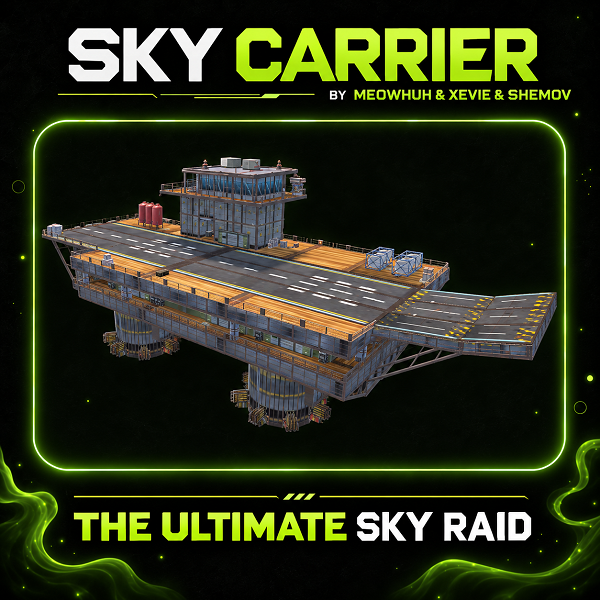
Bring an enormous flying aircraft carrier raid event to your Rust server.
Rust events should offer more than another familiar monument or a simple NPC fight. Imagine a heavily defended aircraft carrier flying above the ocean, protected by SAM Sites, Auto Turrets, and armed scientists, waiting for players brave enough to bring it down.
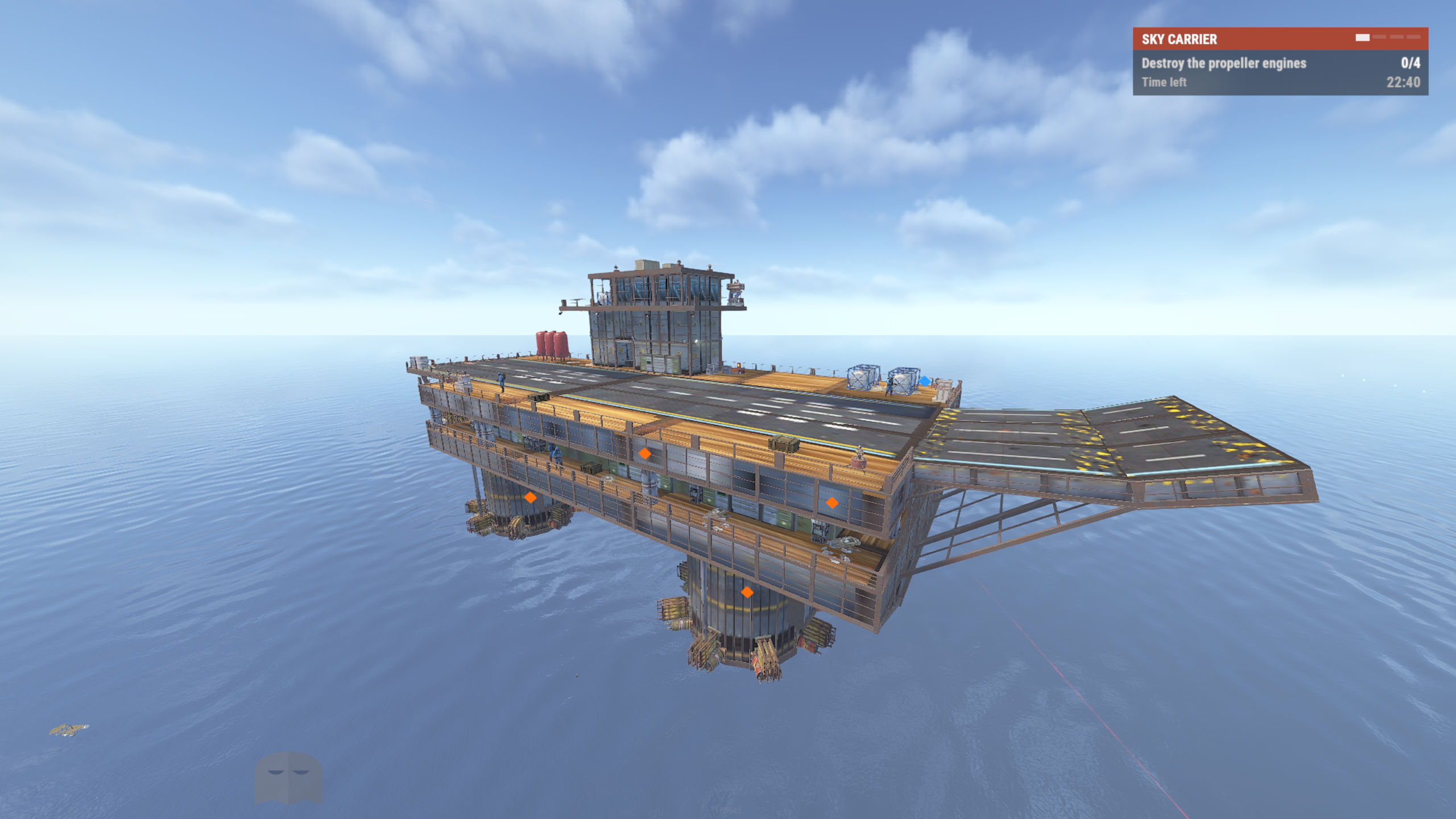
SkyCarrier introduces a massive, multi-stage PvE raid event built around a flying aircraft carrier. Players must approach by helicopter, destroy the carrier's propeller engines, survive its defenses, board the flight deck, and fight their way into the diesel generator room. Destroying the generators causes the carrier to catch fire, fall from the sky, crash into the ocean, and eventually sink.
With configurable flight routes, defensive systems, NPCs, custom loot, a scripted Chinook encounter, rescue boats, map markers, and an interactive event HUD, SkyCarrier delivers a complete aerial raid experience.
Perfect for PvE, PvP, modded, RPG/RP, survival, progression, and custom event Rust servers.
 Features
 SkyCarrier Raid Event
SkyCarrier is designed as a complete raid encounter with multiple objectives that players must complete in order.
The carrier begins high above the ocean, moving between route checkpoints while defending itself against approaching players.
To defeat it, players must complete several stages.
 Flying Aircraft Carrier
SkyCarrier features a large aircraft carrier that moves through the world rather than remaining at a fixed monument location.
The carrier follows configurable flight checkpoints, smoothly changes direction, and stops at configured route positions.
Flight Features
 Destructible Propeller Engines
The first objective is to destroy the propeller engines mounted underneath the carrier.
The engines are special damage targets with configurable health, hit detection, damage types, and positions.
Engine Mechanics
 Diesel Generator Objective
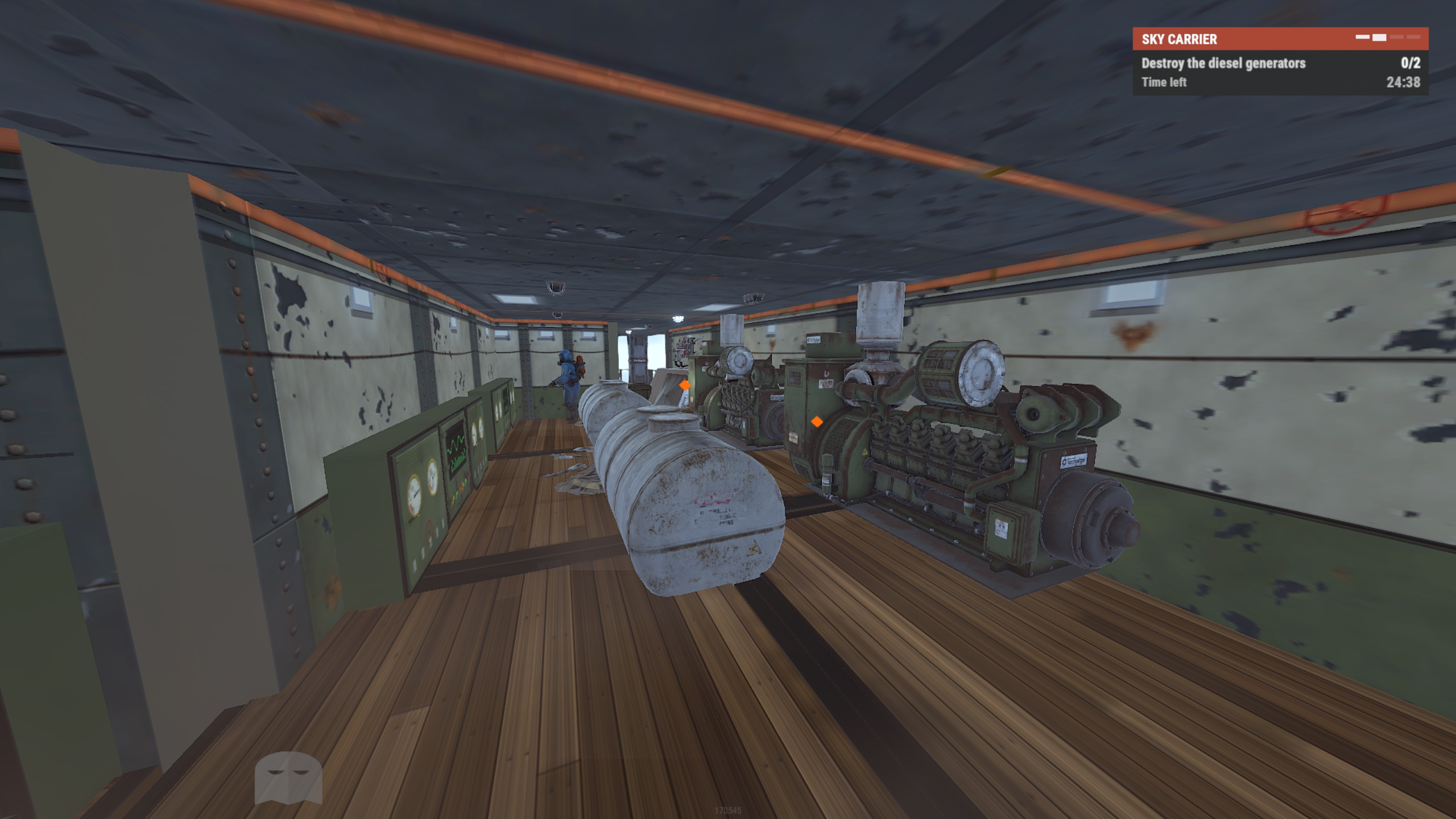
Once the carrier's engines are destroyed, players must board the carrier and locate the diesel generator room.
The diesel generators are the final objectives required to bring the carrier down.
Generator Mechanics
 Carrier Defense System
SkyCarrier features several configurable defense systems that protect the carrier throughout the raid.
 Auto Turrets
 defend the carrier against approaching and boarding players.
Default Auto Turret Settings
 SAM Sites
 protect the flying carrier from approaching aircraft.
Default SAM Site Settings
 Scientist Guards
SkyCarrier includes armed scientists positioned throughout the carrier.
The latest default configuration contains eight scientist guards, including one Heavy Scientist. Several guards and patrol posts have been repositioned to provide improved coverage of the carrier's flight deck and lower decks.
Guard Features
Default Scientist Weapons
The default guards use a selection of Rust weapons, including:
 Crash & Sinking System
Destroying all diesel generators triggers a scripted destruction sequence.
The carrier stops its normal flight, catches fire, and begins falling toward a suitable ocean location.
After reaching the water, the carrier crashes, settles, and begins sinking.
Crash Sequence
Crash Configuration
Chinook Encounter
SkyCarrier includes an optional scripted Chinook sequence after the carrier crashes.
When enabled and a suitable SAM Site is available, a Chinook approaches the crashed carrier and can be shot down over the flight deck.
Chinook Features
 Rescue Boat System
SkyCarrier includes optional rescue boats that arrive after the carrier has crashed.
These boats carry armed scientists that can board the carrier and engage players.
Rescue Features
Default Rescue Settings
 Loot & Rewards
SkyCarrier includes configurable loot containers positioned throughout the aircraft carrier.
The latest default configuration contains 11 loot containers, spread across the flight deck, interior areas, and multiple deck levels. Players can collect these while fighting through the carrier and receive additional rewards after bringing it down.
Loot Container Features
Default Loot Tables
Final Destruction Reward
After the carrier crashes, a special reward crate appears on the flight deck.
The default destruction loot table contains:
 Map Markers & Event Guidance
SkyCarrier includes optional systems to help players locate the event and understand its objectives.
Map Markers
Default marker name:
Default marker color:
Objective Guidance
SkyCarrier can display temporary in-world guidance markers to help nearby players locate important objectives.
Guidance symbols are displayed to nearby players within the supported guidance range.
 Event HUD
SkyCarrier includes an in-game event HUD that updates as players progress through the raid.
The HUD helps players identify their next objective and monitor the remaining event time.
HUD Features
Event HUD Objectives
 Event Scheduling
SkyCarrier can be started manually by an administrator or automatically using the built-in event scheduler.
Scheduling Features
 Admin Commands
SkyCarrier uses console commands for event management.
Command Examples
 Permissions
Rust server admins can also manage the event without being granted the permission separately.
Players do not need permissions to participate in the event, attack the carrier, fight scientists, or collect loot.
 Installation
SkyCarrier supports Rust servers running Oxide (uMod) or Carbon.
The ZIP includes three plugin files:
Installation Steps
Oxide File Structure
Carbon File Structure
 Why Choose SkyCarrier?
Most Rust events take place at familiar monuments or involve enemies that players already know how to defeat. SkyCarrier brings an entirely different challenge to the server by transforming the sky into a dangerous, multi-stage raid environment.
Players must plan their approach, disable anti-air defenses, board a flying aircraft carrier, fight through armed scientists, destroy its generators, survive a dramatic ocean crash, and escape with valuable rewards before the carrier disappears beneath the waves.
With customizable flight routes, destructible objectives, multiple defense systems, animated crash sequences, optional Chinook and rescue encounters, custom loot tables, and an interactive event HUD, SkyCarrier gives server owners the tools to create a unique and memorable aerial raid event.
Rust events should offer more than another familiar monument or a simple NPC fight. Imagine a heavily defended aircraft carrier flying above the ocean, protected by SAM Sites, Auto Turrets, and armed scientists, waiting for players brave enough to bring it down.
SkyCarrier introduces a massive, multi-stage PvE raid event built around a flying aircraft carrier. Players must approach by helicopter, destroy the carrier's propeller engines, survive its defenses, board the flight deck, and fight their way into the diesel generator room. Destroying the generators causes the carrier to catch fire, fall from the sky, crash into the ocean, and eventually sink.
With configurable flight routes, defensive systems, NPCs, custom loot, a scripted Chinook encounter, rescue boats, map markers, and an interactive event HUD, SkyCarrier delivers a complete aerial raid experience.
Perfect for PvE, PvP, modded, RPG/RP, survival, progression, and custom event Rust servers.
Features- Adds a massive flying aircraft carrier event constructed from Rust entities.
- Fully explorable carrier with multiple decks, interior rooms, stairs, and a flight deck.
- Multi-stage raid progression requiring players to disable engines, board the carrier, and destroy generators.
- Animated carrier movement, turning, falling, crashing, and sinking.
- Configurable automatic event scheduling or manual event management.
- Automatically generates an offshore flight route when no custom checkpoints are configured.
- Supports custom flight routes, spawn positions, checkpoint stops, and route looping.
- Configurable flight altitude, movement speed, and turning speed.
- Route validation to avoid Deep Sea areas and portal locations.
- Four default destructible propeller-engine targets.
- Engine damage and health settings, including separate multipliers for different damage types.
- Destroying engines progressively reduces the carrier's movement speed.
- Destroying every propeller engine disables the carrier's SAM defenses and stops its movement.
- Two default diesel generator targets located inside the carrier.
- Diesel generators require explosive damage using the default settings.
- Destroying all diesel generators triggers the carrier's destruction sequence.
- Explosion, fire, and smoke effects during the raid and crash.
- Scripted falling and splashdown sequence with animated movement and rotation.
- Configurable evacuation delay before sinking begins.
- Gradual carrier sinking with a configurable sinking duration.
- Optional Chinook arrival and scripted shootdown encounter after the carrier crashes.
- Configurable locked Chinook crate with adjustable hacking time.
- Optional rescue boats that approach and dock beside the crashed carrier.
- Rescue scientists can climb aboard the carrier and join the fight.
- Configurable scientist counts, equipment, health, damage, and detection ranges.
- Eight default Auto Turrets with configurable weapons, ammunition, health, and damage.
- Two default SAM Sites with configurable ammunition, health, range, and reload behavior.
- Eight default scientist guards, including a Heavy Scientist, with configurable weapons and patrol locations.
- Configurable scientist spawn positions, weapons, health, and patrol areas.
- Optional destruction settings for Auto Turrets and SAM Sites.
- Configurable defensive behavior after the carrier crashes.
- Decorative aircraft on the flight deck, including a default F-15.
- Eleven default loot containers positioned across different areas of the carrier.
- Custom loot tables with configurable items, amounts, chances, and skin IDs.
- Additional reward crate appears after the carrier crashes.
- Optional locked Chinook crate containing configurable rewards.
- Player victory hook triggered when the final destruction reward crate is opened.
- Optional map marker that follows the carrier and displays its current event stage.
- Configurable map marker name and color.
- Optional in-game event HUD displaying raid objectives, target progress, and timers.
- Optional nearby guidance markers for engines, generators, and reward crates.
- Automatic server-wide event announcements.
- English and Russian plugin messages included.
- Admin console commands to start and stop events.
- Admin permission support for event management.
- Developer hooks and an API for integrating with other plugins.
- Automatic cleanup of event entities when the event ends.
- Includes custom carrier model and navigation data files.
SkyCarrier Raid EventSkyCarrier is designed as a complete raid encounter with multiple objectives that players must complete in order.
The carrier begins high above the ocean, moving between route checkpoints while defending itself against approaching players.
To defeat it, players must complete several stages.
| Stage | Objective |
|---|---|
| 1. Approach | Find the flying carrier and approach using a helicopter. |
| 2. Disable Engines | Destroy the propeller engines underneath the carrier. |
| 3. Board the Carrier | Land on the flight deck and fight through its defenses. |
| 4. Destroy Generators | Reach the lower decks and destroy the diesel generators. |
| 5. Carrier Crash | Escape the danger as the carrier catches fire and falls toward the ocean. |
| 6. Final Encounter | Survive the post-crash events, including optional Chinook and rescue scientist encounters. |
| 7. Collect Rewards | Loot the reward crates before the carrier sinks. |
Flying Aircraft CarrierSkyCarrier features a large aircraft carrier that moves through the world rather than remaining at a fixed monument location.
The carrier follows configurable flight checkpoints, smoothly changes direction, and stops at configured route positions.
Flight Features
- Configurable flying altitude.
- Adjustable movement and turning speed.
- Automatic offshore route generation.
- Custom route checkpoints.
- Configurable waiting time at checkpoints.
- Optional looping flight routes.
- Custom spawn coordinates.
- Deep Sea and portal clearance checks.
- Decorative aircraft positioned on the flight deck.
| Flight Setting | Default |
|---|---|
| Minimum flight height | 120 meters |
| Movement speed | 12 m/s |
| Turning speed | 15 degrees/second |
| Checkpoint waiting time | 60 seconds |
| Repeat flight route | Enabled |
| Deep Sea clearance | 400 meters |
Destructible Propeller EnginesThe first objective is to destroy the propeller engines mounted underneath the carrier.
The engines are special damage targets with configurable health, hit detection, damage types, and positions.
| Setting | Default |
|---|---|
| Number of engines | 4 |
| Health per engine | 750 HP |
| Hit radius | 6 meters |
| Explosion damage multiplier | 1.0 |
| Anti-vehicle damage multiplier | 1.0 |
| Bullet damage multiplier | 0.02 |
Engine Mechanics
- Four propeller-engine targets by default.
- Each engine has its own health.
- Configurable engine positions.
- Separate damage multipliers for bullets, explosions, and anti-vehicle damage.
- Destruction effects when an engine is destroyed.
- Carrier movement speed decreases as engines are destroyed.
- Destroying all engines stops the carrier.
- SAM Sites are disabled when every propeller engine is destroyed.
Diesel Generator ObjectiveOnce the carrier's engines are destroyed, players must board the carrier and locate the diesel generator room.
The diesel generators are the final objectives required to bring the carrier down.
| Setting | Default |
|---|---|
| Number of generators | 2 |
| Health per generator | 900 HP |
| Hit radius | 3.6 meters |
| Explosion damage multiplier | 1.0 |
Generator Mechanics
- Two diesel generator targets by default.
- Located within the carrier's lower decks.
- Individual health and damage detection.
- Configurable generator positions.
- Damage-type multipliers.
- Destruction effects for each generator.
- Destroying every generator triggers the carrier crash sequence.
Carrier Defense SystemSkyCarrier features several configurable defense systems that protect the carrier throughout the raid.
| Defense Type | Default Amount | Description |
|---|---|---|
| Auto Turrets | 8 | Armed turrets positioned around the carrier. |
| SAM Sites | 2 | Anti-aircraft defenses protecting the carrier from approaching aircraft. |
| Scientist Guards | 8 | Armed scientists guarding the flight deck and interior areas. |
| Rescue Scientists | Up to 6 | Additional scientists arriving by rescue boats after the crash. |
Auto TurretsAuto Turrets defend the carrier against approaching and boarding players.
- Configurable turret positions and rotations.
- Custom weapon and ammunition shortnames.
- Configurable ammunition per turret.
- Adjustable health.
- Configurable detection radius.
- Adjustable damage multiplier.
- Option to make turrets destructible or invulnerable.
- Optional continued operation after the carrier crashes.
Default Auto Turret Settings
| Setting | Default |
|---|---|
| Health | 1,000 HP |
| Weapon | rifle.ak |
| Ammunition | ammo.rifle |
| Rounds per turret | 512 |
| Detection range | 45 meters |
| Damage multiplier | 1.0 |
| Destructible | Yes |
SAM SitesSAM Sites protect the flying carrier from approaching aircraft.
- Configurable SAM Site positions.
- Adjustable health.
- Configurable rocket ammunition.
- Adjustable detection range.
- Configurable damage multiplier.
- Configurable delay between volleys.
- Option to make SAM Sites destructible.
- Automatically disabled when all propeller engines are destroyed.
Default SAM Site Settings
| Setting | Default |
|---|---|
| Health | 1,000 HP |
| Rockets per SAM Site | 48 |
| Detection range | 150 meters |
| Damage multiplier | 1.0 |
| Time between volleys | 10 seconds |
| Destructible | Yes |
Scientist GuardsSkyCarrier includes armed scientists positioned throughout the carrier.
The latest default configuration contains eight scientist guards, including one Heavy Scientist. Several guards and patrol posts have been repositioned to provide improved coverage of the carrier's flight deck and lower decks.
Guard Features
- Eight guards in the updated default layout.
- Configurable scientist spawn locations and rotations.
- Supports standard and Heavy Scientist prefabs.
- Custom health per scientist.
- Configurable weapons and clothing.
- Adjustable damage multiplier.
- Configurable target detection range.
- Individual patrol radius settings.
- Guards respond to nearby threats.
- Custom navigation data supports movement around the carrier.
Default Scientist Weapons
The default guards use a selection of Rust weapons, including:
- LR-300 Assault Rifle.
- MP5A4.
- M249.
- SPAS-12 Shotgun.
- Assault Rifle (AK).
| Guard Type | Default Health | Default Equipment |
|---|---|---|
| Regular Scientist | 250 HP | Configured firearms |
| Heavy Scientist | 500 HP | M249 |
Crash & Sinking SystemDestroying all diesel generators triggers a scripted destruction sequence.
The carrier stops its normal flight, catches fire, and begins falling toward a suitable ocean location.
After reaching the water, the carrier crashes, settles, and begins sinking.
Crash Sequence
- Diesel generators are destroyed.
- Fire and explosion effects activate throughout the carrier.
- The carrier starts falling toward the ocean.
- The carrier impacts the water.
- The carrier settles after the initial impact.
- The final reward crate becomes available.
- Optional Chinook and rescue boat encounters begin.
- Players have a limited time to collect rewards and escape.
- The carrier gradually sinks beneath the water.
Crash Configuration
| Setting | Default |
|---|---|
| Target hull depth after impact | 8 meters |
| Evacuation time before sinking | 20 seconds |
| Sinking duration | 600 seconds |
| Keep Auto Turrets active after impact | No |
| Keep SAM Sites active after impact | No |
Chinook EncounterSkyCarrier includes an optional scripted Chinook sequence after the carrier crashes.
When enabled and a suitable SAM Site is available, a Chinook approaches the crashed carrier and can be shot down over the flight deck.
Chinook Features
- Optional Chinook arrival after the crash.
- Scripted helicopter approach.
- SAM Site aiming and missile effects.
- Chinook hit and crash animation.
- Explosion and wreck effects.
- Configurable crash position.
- Hackable locked crate after the Chinook crashes.
- Configurable hacking duration.
- Custom loot table for the Chinook crate.
| Setting | Default |
|---|---|
| Chinook encounter enabled | Yes |
| Locked crate hacking time | 300 seconds |
| Crate loot table | Elite |
Rescue Boat SystemSkyCarrier includes optional rescue boats that arrive after the carrier has crashed.
These boats carry armed scientists that can board the carrier and engage players.
Rescue Features
- Configurable rescue boat arrival delay.
- Multiple boat docking positions.
- Uses Rust RHIB boats.
- Configurable scientists per boat.
- Armed rescue scientists.
- Custom scientist health, weapons, clothing, and damage.
- Animated boat approach and docking movement.
- Boarding ladders created beside the carrier.
- Scientists climb aboard and join the encounter.
- Boats can be released after their crews have disembarked.
Default Rescue Settings
| Setting | Default |
|---|---|
| Rescue boats enabled | Yes |
| Delay after crash | 30 seconds |
| Configured boats | 2 |
| Scientists per boat | 3 |
| Scientist health | 200 HP |
| Scientist weapon | smg.mp5 |
| Detection range | 60 meters |
Loot & RewardsSkyCarrier includes configurable loot containers positioned throughout the aircraft carrier.
The latest default configuration contains 11 loot containers, spread across the flight deck, interior areas, and multiple deck levels. Players can collect these while fighting through the carrier and receive additional rewards after bringing it down.
Loot Container Features
- Eleven default loot containers in the latest layout.
- Normal, Tools, and Elite crate prefabs.
- Configurable container positions and rotations.
- Multiple Military loot locations.
- Custom loot tables.
- Configurable item shortnames.
- Minimum and maximum item amounts.
- Individual item drop chances.
- Optional custom skin IDs.
- Additional destruction reward crate.
- Separate loot table for the locked Chinook crate.
Default Loot Tables
| Loot Table | Example Default Items |
|---|---|
| Standard | Scrap, Metal Pipes |
| Military | Assault Rifle, Rifle Ammo |
| Elite | Tech Trash, Rifle Bodies |
| Technical | Gears, CCTV Cameras |
| Special | Targeting Computers, Timed Explosives |
| Destruction | Scrap, Rockets, Tech Trash |
Final Destruction Reward
After the carrier crashes, a special reward crate appears on the flight deck.
The default destruction loot table contains:
| Item | Amount | Chance |
|---|---|---|
| Scrap | 500–800 | 100% |
| Rockets | 2–4 | 100% |
| Tech Trash | 10–20 | 100% |
Map Markers & Event GuidanceSkyCarrier includes optional systems to help players locate the event and understand its objectives.
Map Markers
- Displays the carrier's location on the Rust map.
- Marker follows the moving carrier.
- Configurable marker name.
- Configurable marker color.
- Displays the current carrier event stage.
- Automatically removes markers when the event ends.
Default marker name:
SKY CARRIERDefault marker color:
#E67E22Objective Guidance
SkyCarrier can display temporary in-world guidance markers to help nearby players locate important objectives.
- Propeller-engine targets.
- Diesel generator targets.
- Important access areas.
- Final destruction reward crate.
- Locked Chinook crate.
Guidance symbols are displayed to nearby players within the supported guidance range.
Event HUDSkyCarrier includes an in-game event HUD that updates as players progress through the raid.
The HUD helps players identify their next objective and monitor the remaining event time.
HUD Features
- Displays the current raid objective.
- Shows destroyed engine progress.
- Shows destroyed generator progress.
- Displays the event timer.
- Displays the time until impact during the crash sequence.
- Shows the remaining evacuation time.
- Displays the sinking countdown.
- Updates objectives as the event progresses.
- Automatically appears for nearby players.
- Automatically disappears when players leave the event area or the event ends.
Event HUD Objectives
| Event Stage | HUD Objective |
|---|---|
| Flight | Destroy the propeller engines. |
| Carrier Disabled | Destroy the diesel generators. |
| Falling | Carrier falling. Brace for impact. |
| Impact Recovery | Head up to the flight deck. |
| Evacuation | Get clear of the lower decks. |
| Chinook Arrival | Chinook approaching the carrier. |
| Chinook Crash | Chinook hit. Clear the flight deck. |
| Final Phase | Loot the flight deck and evacuate. |
Event SchedulingSkyCarrier can be started manually by an administrator or automatically using the built-in event scheduler.
| Setting | Default |
|---|---|
| Automatic events | Disabled |
| Delay before next automatic event | 7,200 seconds |
| Airborne event time limit | 1,800 seconds |
Scheduling Features
- Enable or disable automatic events.
- Configure the delay before the next event.
- Configurable airborne event time limit.
- Prevents multiple simultaneous SkyCarrier events.
- Automatically schedules another event after the previous event ends when scheduling is enabled.
- Manual commands for starting and stopping events.
Admin CommandsSkyCarrier uses console commands for event management.
skycarrier.start - Starts a SkyCarrier event.skycarrier.stop - Stops the currently active SkyCarrier event.Command Examples
Код:
skycarrier.start
skycarrier.stopskycarrier.admin - Allows authorized players to start and stop SkyCarrier events using the console commands.Rust server admins can also manage the event without being granted the permission separately.
Players do not need permissions to participate in the event, attack the carrier, fight scientists, or collect loot.
InstallationSkyCarrier supports Rust servers running Oxide (uMod) or Carbon.
The ZIP includes three plugin files:
SkyCarrier.cs- Main plugin file.data/SkyCarrier/SkyCarrier.json- Required aircraft carrier model data.data/SkyCarrier/SkyCarrierNavMesh.json- Navigation data for scientist movement.
Installation Steps
- Extract the downloaded SkyCarrier ZIP archive.
- Upload
SkyCarrier.csto your server's plugin folder:- Oxide:
oxide/plugins/ - Carbon:
carbon/plugins/
- Oxide:
- Upload
SkyCarrier.jsonandSkyCarrierNavMesh.jsonto your server's data folder:- Oxide:
oxide/data/SkyCarrier/ - Carbon:
carbon/data/SkyCarrier/
- Oxide:
- Make sure both data files are located inside the
SkyCarrierfolder. - Load or reload the SkyCarrier plugin.
- Edit the generated configuration:
- Oxide:
oxide/config/SkyCarrier.json - Carbon:
carbon/configs/SkyCarrier.json
- Oxide:
- Configure automatic scheduling if you want events to start automatically, or use
skycarrier.startto begin an event manually.
Oxide File Structure
Код:
oxide/
├── plugins/
│   └── SkyCarrier.cs
├── data/
│   └── SkyCarrier/
│       ├── SkyCarrier.json
│       └── SkyCarrierNavMesh.json
└── config/
    └── SkyCarrier.json
Carbon File Structure
Код:
carbon/
├── plugins/
│   └── SkyCarrier.cs
├── data/
│   └── SkyCarrier/
│       ├── SkyCarrier.json
│       └── SkyCarrierNavMesh.json
└── configs/
└── SkyCarrier.jsonMost Rust events take place at familiar monuments or involve enemies that players already know how to defeat. SkyCarrier brings an entirely different challenge to the server by transforming the sky into a dangerous, multi-stage raid environment.
Players must plan their approach, disable anti-air defenses, board a flying aircraft carrier, fight through armed scientists, destroy its generators, survive a dramatic ocean crash, and escape with valuable rewards before the carrier disappears beneath the waves.
With customizable flight routes, destructible objectives, multiple defense systems, animated crash sequences, optional Chinook and rescue encounters, custom loot tables, and an interactive event HUD, SkyCarrier gives server owners the tools to create a unique and memorable aerial raid event.